
Introduction #
Before we start lets me explain how did I can get the Firmware of this device, because if you try to find it anywhere that should be find zero, I bought this device in 2022 maybe, the reason is my primary one are trash, so! this devices is bought and hell yaa its a trasher than the old one. There is so many bug exist, here for example:
- Refusing default reset (always timeout)
- Refusing to save configuration (always timeout)
- MESH mode is hard to switch, much better you to not touch this one (root problem)
- No Firmware update on the Internet
- Anoying auto-refresh on mobile browser
After determining I decide to RMA, but before. for the last time I try to connect with official vendor and asking for latest Firmware because it already brick for 1 year, but there is non of they recognizing this device, even the official one (not branch)!
I mean wtf? but, I still trying to find another way. The “branch vendor!” and I found it in my country, then finally! I got new firmware. But, guess what? this shit still refusing to update (always timeout), hell ya! Then we deal to RMA. The new one is came up, within 20 DAYS of delivery in the same country, for just waiting for another trash. Alright lets end up here, Lets do our things! you’ll find why this devices are shit!
Methodology #
Firmware download #
First you need to download firmware github or archive.
root@VM:~/thetruth# wget https://github.com/zxhri/DIR-1253/releases/download/release/DLINK_N2M_ID_V1.6.1684.binThen verify with md5sum for integrity.
root@VM:~/thetruth# md5sum DLINK_N2M_ID_V1.6.1684.bin
0d128fbc0daf4fb19b20e4783ca1c0e5 DLINK_N2M_ID_V1.6.1684.binAfter done lets analyse. I’ll using binwalk, to got information about the partition of this firmware.
Binwalk Partition Analysis #
root@VM:~/thetruth# binwalk DLINK_N2M_ID_V1.6.1684.binDECIMAL HEXADECIMAL DESCRIPTION
--------------------------------------------------------------------------------
10264 0x2818 LZMA compressed data, properties: 0x5D, dictionary size: 8388608 bytes, uncompressed size: 7981640 bytes
2456610 0x257C22 Squashfs filesystem, little endian, version 4.0, compression:xz, size: 3242932 bytes, 753 inodes, blocksize: 131072 bytes, created: 2038-04-24 02:16:32Using binwalk we got some information about the firmware. after that we need own rootfs
partition, in this case type of rootfs is Squashfs, the address of partition is 2456610 in decimal.
The next step, we need to extract using dd to acquisite this partition.
Extracting RootFS #
root@VM:~/thetruth# dd if=DLINK_N2M_ID_V1.6.1684.bin of=squashfs.img bs=1 skip=2456610 status=progressWait till the end, the output should like this.
3231325 bytes (3.2 MB, 3.1 MiB) copied, 12 s, 269 kB/s
3244043+0 records in
3244043+0 records out
3244043 bytes (3.2 MB, 3.1 MiB) copied, 12.0474 s, 269 kB/sAnd then we will using unsquashfs to extract the firmware. The output will be squashfs-root directory.
root@VM:~/thetruth# unsquashfs squashfs.img
root@VM:~/thetruth# ls
DLINK_N2M_ID_V1.6.1684.bin squashfs-root squashfs.imgRootFS Analysis #
After you got the rootfs directory you can browse in over and /var directory are
primary environment for live production, because important thing are symlink into /var.
root@VM:~/thetruth/squashfs-root# ls -la
total 56
drwxr-xr-x 12 root root  4096 Sep 28  2021 .
drwxr-xr-x  3 root root  4096 Mar 18 13:50 ..
drwxr-xr-x  3 root root  4096 Sep 28  2021 bin
drwxr-xr-x  6 root root 12288 Sep 28  2021 dev
drwxr-xr-x 11 root root  4096 Sep 28  2021 etc
drwxr-xr-x  2 root root  4096 Sep 28  2021 home
lrwxrwxrwx  1 root root     8 Sep 28  2021 init -> bin/init
drwxr-xr-x  3 root root  4096 Sep 28  2021 lib
drwxr-xr-x  2 root root  4096 Sep 28  2021 mnt
drwxr-xr-x  2 root root  4096 Sep 28  2021 proc
lrwxrwxrwx  1 root root     9 Sep 28  2021 root -> /var/root
drwxr-xr-x  2 root root  4096 Sep 28  2021 sys
lrwxrwxrwx  1 root root     8 Sep 28  2021 tmp -> /var/tmp
drwxr-xr-x  5 root root  4096 Sep 28  2021 usr
drwxr-xr-x  2 root root  4096 Sep 28  2021 var
lrwxrwxrwx 1 root root 8 Sep 28 2021 web -> /var/webAfter that we will using firmwalker to gain some information about this rootfs.
root@VM:~/thetruth/firmwalker# ./firmwalker.sh ../squashfs-root/ dlink-dir1253.txt root@VM:~/thetruth/firmwalker# cat dlink-dir1253.txt | head -n 20; cat dlink-dir1253.txt | wc -l
***Firmware Directory***
../squashfs-root/
***Search for password files***
##################################### passwd
/bin/passwd
/etc/passwd
##################################### shadow
##################################### *.psk
***Search for Unix-MD5 hashes***
../squashfs-root/etc/shadow.sample:$1$KEKJV2R0$TFJ4jy7waGKrjdNHwPGzV.
***Search for SSL related files***
##################################### *.crt
/etc/certificate.crt
Shodan cli not found.
334There is 300 line more on the output, but here I’ll cover in short for ease.
Interesting part #
Alot of information yeah? and this what I’ve found.
/etc/shadow.sample
/bin/script/* -> /bin/script/cscripts
/etc/init.d/rcS_AP
/etc/init.d/rcS_GW
/bin/flashArchitecture #
# file busybox
busybox: ELF 32-bit LSB executable, MIPS, MIPS32 rel2 version 1 (SYSV), BuildID[sha1]=09c0e208fdd55b6b59847226b972c71dc9ac2c28, dynamically linked, interpreter /lib/ld-uClibc.so.0, no section headerHardcoded Password #
/etc/shadow.sample this script file leakage credentials with user:pass is (root:root)
root@VM:~/thetruth/squashfs-root/etc# john shadow.sample  --show
root:root:14587:0:99999:7:::

1 password hash cracked, 0 leftLinked into Single Direction #
/bin/script/* -> /bin/script/cscripts this directory symlink all script into cscripts
root@VM:~/thetruth/squashfs-root/bin/script# ls -la | head -n 10
total 128
drwxr-xr-x 2 root root   4096 Sep 28  2021 .
drwxr-xr-x 3 root root   4096 Sep 28  2021 ..
lrwxrwxrwx 1 root root     20 Sep 28  2021 bridge.sh -> /bin/script/cscripts
-rwxr-xr-x 1 root root 121164 Sep 28  2021 cscripts
lrwxrwxrwx 1 root root     20 Sep 28  2021 cwmp.sh -> /bin/script/cscripts
lrwxrwxrwx 1 root root     20 Sep 28  2021 ddns.sh -> /bin/script/cscripts
lrwxrwxrwx 1 root root     20 Sep 28  2021 dhcp6.sh -> /bin/script/cscripts
lrwxrwxrwx 1 root root     20 Sep 28  2021 dhcpcv4down.sh -> /bin/script/cscripts
lrwxrwxrwx 1 root root 20 Sep 28 2021 dhcpcv4up.sh -> /bin/script/cscriptsPassword Leak Process #
/etc/init.d/rcS_{AP,GW} both file containing process about copying credentials
/etc/shadow.sample into /var, which mean user:pass root:root are used.
root@VM:~/thetruth/squashfs-root/etc/init.d# grep -R "shadow"
rcS_AP:cp /etc/shadow.sample /var/shadow
rcS_GW:cp /etc/shadow.sample /var/shadowDlink DIR-1253 Revelation #
/bin/flash is containing the truth about what exactly this device is.
root@VM:~/thetruth/squashfs-root/bin# strings flash | grep netis
netis
netis.cc
netis_5G_VAP%d
netis_2.4G_VAP%d
netis_5G_%02X%02X%02X
netis_2.4G_%02X%02X%02X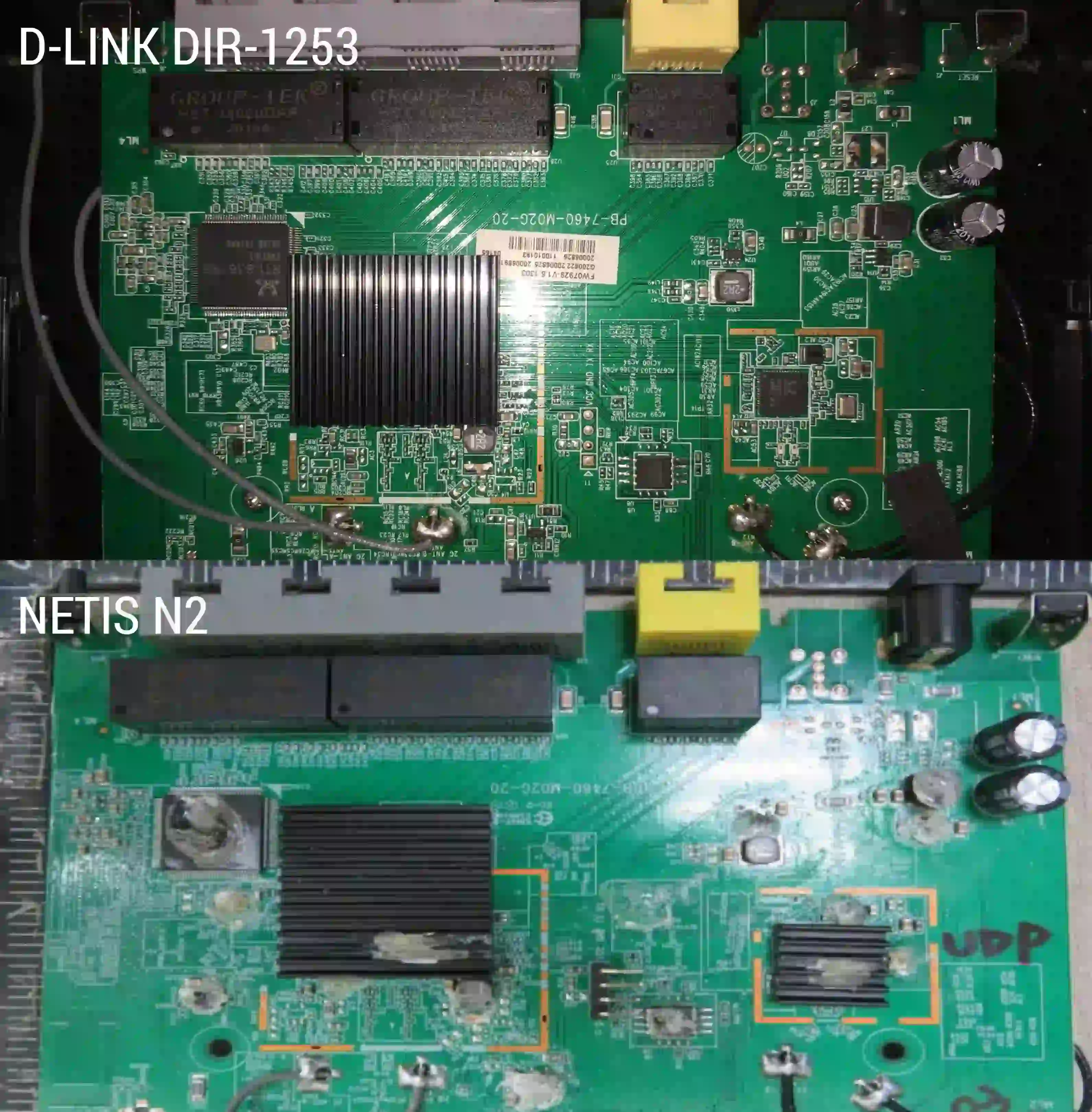
Here what they say:
I don’t recognize this model number, and D-Link Corporation doesn’t offer me any information as well.
Can you tell me the region you received the product, this may be a local domestic model only, and support is handled directly by that specific regional office.
Let me know.
Thank You,
D-Link US SIRT
Conclusion #
After do some analysis we can see what exactly the device is, this device are not exactly from vendor
there is leakage source inside /bin/flash. This binary are containing about other name vendor (NETIS), if you interesting about that, you try to compare
D-Link DIR-1253 and Netis N2M, if you look it back at the top the file name are equal, that why
the name of firmware file containing “N2M” that the shitness, both are equal even the Hardware, Web-UI, and SoC.
I’ve try to update with the Netis firmware but nothing, the device will refuse it, maybe they implemented something for just
trusted Dlink can passthrough.
This bit references:
- SoC: RTL8197f-v5
- Switch: RTL8367RB - K4N73EI GK188 TAIWAN
- PCIe: RTL8812FR - K456PI
- SPI: Winbound - 25Q64JVSIQ 2009
- OpenWrt Forum: Netis N2